Unlock Creative Magic with Pickley: The Watercolor SVG Font
When it comes to digital design, finding a typeface that bridges the gap between polished professionalism and raw, artistic charm can be a challenge. Many designers settle for standard sans-serifs or try to manually texture their letters to get that "hand-painted" look. Enter Pickley, a distinct OpenType SVG font that offers an immediate solution. Born from a popular watercolor alphabet, Meet Pickley is not just another typeface; it is a toolkit for creating catchy, artistic headers without the mess of traditional media.
The Essence of "Meet Pickley"
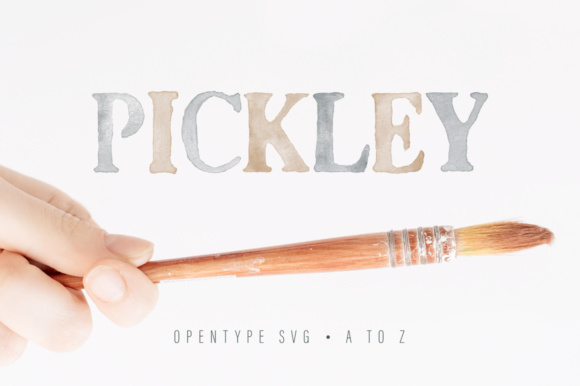
At its core, Meet Pickley is a basic, no-nonsense OpenType SVG bitmap font. If you are wondering what that means in practical terms, think of it as a font that acts like a stamp for high-resolution artwork. Unlike standard vector fonts that rely on flat color or simple gradients, SVG (Scalable Vector Graphics) fonts allow for complex textures, transparency, and color variations within a single glyph. Pickley takes this technology and applies it to a watercolor aesthetic. The result is a typeface that looks like it was just painted onto the page, complete with the natural bleed and pigment density found in real watercolor art.
The design philosophy behind Pickley is intentionally minimalist regarding its character set. It is limited strictly to the alphabet and basic punctuation. You will not find numbers or multilingual glyphs here. Why? Because the purpose of this font is hyper-specific. It is designed solely for catchy headers, impactful titles, and short, punchy phrases. It strips away the complexity of a full-families font to focus entirely on visual impact.
A Perfect Fit for Modern Software
One of the most critical factors when adopting a new typeface is compatibility. Pickley shines in environments that support advanced font rendering. It is fully compatible with major design software, including:
- Adobe Photoshop: Ideal for social media graphics and photo overlays.
- Adobe Illustrator: Perfect for vector-based branding and logo design.
- Silhouette Studio: Great for crafters who want to add a painted touch to their projects.
- Inkscape: A powerful free alternative for those using open-source software.
However, it is vital to address a common hurdle in the crafting community. Pickley is not compatible with Cricut machines. This is a technical limitation of the OpenType SVG format, which Cricut software does not currently support for standard cutting workflows. If you are a Cricut user, you can still use the font for print designs, but you cannot cut the letter shapes directly as you would a standard vector font. For those using Silhouette or desktop publishing software, however, the workflow is seamless.
Practical Applications: Where Pickley Shines
How does a watercolor font fit into a modern workflow? The versatility of Pickley lies in its ability to evoke a specific mood instantly. In a digital landscape often dominated by clean lines and sharp edges, the organic feel of Pickley provides a welcome contrast.
Branding and Stationery
For small businesses, particularly in the lifestyle, wedding, or artisan sectors, brand voice is everything. Using Pickley for headers on a website or on printed stationery can communicate a sense of warmth and craftsmanship. Imagine a bakery menu or a boutique clothing tag featuring the Pickley typeface; it immediately suggests that the product is made with care and creativity. It is particularly effective for logos that aim for a "boho" or "earthy" aesthetic.
Digital Content and Social Media
Social media managers know that stopping the scroll is the primary goal. A flat, standard font often blends into the background of a busy Instagram feed. Pickley, with its rich texture and color depth, grabs attention. It is excellent for creating quote graphics, sale announcements, or story headers. Because it is an SVG font, the texture remains crisp even when scaled, ensuring your graphics look professional on high-resolution mobile screens.
Crafting and Scrapbooking
While Cricut users may face limitations, Silhouette users and digital scrapbookers can leverage Pickley to add layers to their projects. In scrapbooking, the hardest part is often making digital pages look "real." By using a bitmap font like Pickley, you bypass the artificial look of digital vectors. The font adds an instant layer of realism to digital journals, photo albums, and printable art.
Understanding the Technical Nuances
It is worth diving a little deeper into the technical nature of Pickley to ensure you get the most out of it. As an OpenType SVG font, it functions differently than the TTF (TrueType Font) or OTF (OpenType Font) files you might be used to. When you install Pickley, you are essentially installing a font that contains embedded image data.
The "No-Nonsense" Approach
The description of Pickley as a "no-nonsense" font refers to its utility. It does not pretend to be a body text font. It does not try to be a universal solution for all typographic problems. Instead, it does one thing—it creates beautiful, textured headers—and it does it exceptionally well. This specialization is actually a benefit for designers who suffer from decision fatigue. When you open Pickley, you know exactly what you are getting: a watercolor aesthetic that is ready to use.
Color Considerations
Because Pickley is based on a watercolor alphabet, the default color is typically a specific hue chosen by the designer. However, depending on your software, you may be able to adjust the color properties. In Photoshop, for instance, you can often overlay the font with different blending modes to change its appearance. This allows you to take the base texture of Pickley and adapt it to fit a specific color palette, whether you need a deep indigo for a moody vibe or a soft blush for a romantic project.
Maximizing the Impact of Pickley
To truly master the use of this font, consider the context of your design. Because Pickley has a distinct personality, it pairs best with simple, clean backgrounds. If you place it over a busy, patterned background, the texture of the letters may get lost. A solid color or a subtle texture allows the watercolor effect of Pickley to stand out.
Furthermore, spacing is key. Handwritten and painted fonts often require a bit of manual kerning (adjusting the space between letters) to look perfect. While Pickley is designed to flow naturally, taking the time to adjust the tracking on your headers can elevate the final product from "amateur" to "designer."
Who is Pickley For?
Pickley is for the designer who values efficiency and aesthetics equally. It is for the entrepreneur who wants to add a personal touch to their marketing materials without spending hours painting and scanning letters. It is for the scrapbooker who wants a digital look that feels analog. If your workflow involves creating headers that need to pop with color and character, Pickley is an indispensable addition to your font library.
In summary, Meet Pickley is more than just a collection of letters; it is a bridge between digital convenience and traditional artistry. By understanding its limitations—like the lack of numbers and Cricut incompatibility—and embracing its strengths, such as its rich SVG texture and software compatibility, you can unlock a new level of creativity in your projects. Whether you are designing a wedding invite or a social media campaign, Pickley provides that perfect, hand-painted touch that standard fonts simply cannot replicate.