Label Machine: Unlocking the Potential of a Decorative Powerhouse
Why This Font Captivates Designers and Entrepreneurs
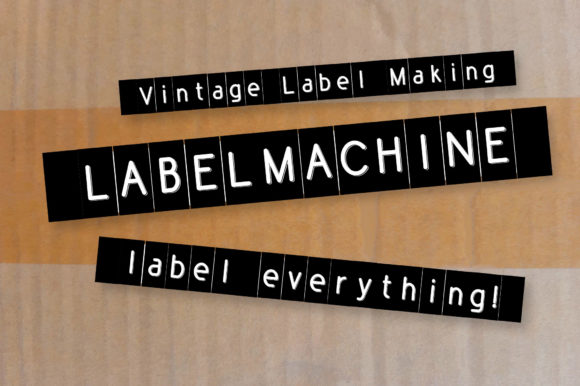
In the vast ocean of digital typography, finding a font that balances personality with professionalism can feel like searching for a needle in a haystack. Enter Label Machine, a typeface that has carved out a distinct niche for itself. At first glance, it is a cool, adaptable, and simple decorative font. Its natural, slightly retro, and unique style makes it incredibly fitting for a large pool of designs, ranging from vintage product packaging to modern social media graphics. However, its true power lies in its versatility. Whether you are a small business owner looking to brand your artisanal products, a blogger wanting to add flair to your headers, or a freelancer designing a client's logo, Label Machine offers a solution that feels both authentic and approachable.
The appeal of Label Machine is not just in its aesthetic charm; it is in the way it communicates. Typography is the voice of design. A sterile, corporate sans-serif speaks in a monotone, while a chaotic script might scream. Label Machine, conversely, strikes a conversation. It feels handmade yet precise, industrial yet personal. This duality makes it a favorite among creators who want to evoke nostalgia without looking dated. However, like any powerful tool, using it effectively requires more than just a simple click and drag. The line between "charming vintage" and "cluttered mess" is often drawn by how well the designer understands the font's nuances.
Avoiding the "Christmas Tree" Effect
One of the most common pitfalls beginners encounter when using decorative fonts like Label Machine is the "Christmas Tree" effect. This occurs when a design features too many competing elements. Because Label Machine has such a distinct personality, it demands space and respect. A frequent mistake is pairing it with another highly stylized script font or a busy background pattern. This creates visual noise that makes the text illegible and the design amateurish.
I have seen countless flyers and social media posts where the creator clearly loved the font but didn't know when to stop. They might use Label Machine for the headline, the sub-headline, and the call to action. The result? The eye has nowhere to rest, and the message is lost. The golden rule for using Label Machine effectively is restraint. It is a star player, not a backup singer. To avoid this error, treat the font as a focal point. Pair it with a clean, neutral sans-serif or a simple serif for body text. This contrast allows the unique style of Label Machine to shine without overwhelming the viewer.
Understanding Context and Audience
Another oversight often made by hobbyists and even some professionals is ignoring the context of the project. Just because a font looks "cool" doesn't mean it fits the brief. Label Machine carries a specific vibe—it leans towards industrial, vintage, and handcrafted aesthetics. If you are designing a website for a high-end, ultra-modern law firm, this font might send the wrong message. It could inadvertently make the firm look less serious or established.
Conversely, for a craft brewery, a coffee shop, or a lifestyle blog, Label Machine is often the perfect choice. The misunderstanding here lies in evaluating the font in isolation rather than within the ecosystem of the brand. Before downloading or purchasing, ask yourself: Does this font align with the core values of the project? Does it speak to the target demographic? If your audience expects sleek minimalism, Label Machine might feel jarring. But if they appreciate authenticity, craftsmanship, or a touch of nostalgia, this font will resonate deeply. It is not about the font being "good" or "bad"; it is about the font being "right."
Technical Traps: Kerning and Hierarchy
When you move from the conceptual phase to the technical application, the challenges shift. A frequent technical mistake with decorative fonts is neglecting kerning and tracking. Label Machine is designed with a natural flow, but depending on the software you use, the default spacing between letters might not be perfect for every word. Ignoring this can lead to awkward gaps or letters crashing into one another, which destroys the "handmade" illusion.
Furthermore, establishing a clear hierarchy is vital. Many users download Label Machine and immediately make everything on the page the same size. This flattens the design. A better approach is to use scale to your advantage. Use Label Machine for your primary headline at a large size to showcase its detailed textures. Then, drop down significantly in size for your body text using a complementary, readable font. This creates a rhythm that guides the reader's eye naturally from the most important information to the supporting details. If you are using the font for labels or packaging, ensure there is enough contrast between the text and the background to maintain legibility at smaller sizes.
Licensing, Formats, and Technical Specifications
Before you fall in love with Label Machine for a commercial project, you must address the logistics. A significant error that can lead to legal headaches or project delays is ignoring the licensing agreement. Free fonts often come with restrictions. They might be free for personal use but require a license for commercial applications. Assuming a font is free just because you found it on a random website is a risky gamble.
Always verify the source. Are you downloading from a reputable foundry or a third-party aggregator? Check the file format as well. While TTF (TrueType Font) is standard, OTF (OpenType Font) often provides more features, such as alternate characters and ligatures that can elevate your design. If you are a web developer, ensure you have the correct web font files (WOFF/WOFF2) to ensure fast loading times and compatibility across different browsers. Taking five minutes to read the "ReadMe" file or the license text can save you hours of rework later.
Practical Application: From Screen to Print
Finally, consider the medium. Label Machine looks fantastic on a high-resolution screen, but how does it translate to physical products? One common mistake is failing to test the font in the intended environment. A font that looks sharp on a website might look muddy on a textured paper stock or a low-resolution thermal printer.
If you are creating physical labels, business cards, or merchandise, always print a test sample. Pay attention to the weight of the font. Does the ink bleed? Do the fine details of the decorative elements get lost when printed small? For entrepreneurs creating product labels, this step is non-negotiable. You might need to adjust the font size, the color contrast, or even the material you are printing on to ensure the final product reflects the quality of your brand. For digital creators, ensure you are optimizing the font files for the web so that your site speed isn't negatively impacted by heavy font assets.
Embracing the Character of Label Machine
Ultimately, Label Machine is more than just a collection of vectors; it is a tool for expression. Its natural and unique style offers a bridge between the digital and the analog, the modern and the retro. By avoiding the common mistakes of over-styling, contextual mismatch, technical neglect, and licensing oversight, you can harness its full potential. Whether you are crafting a logo, designing a menu, or laying out a magazine spread, let the font do what it does best: add character. The only limit is your imagination, provided you pair that imagination with a disciplined approach to design execution.