Pavesky: Elevating Your Brand with Luxury Elegant Sans Serif Design
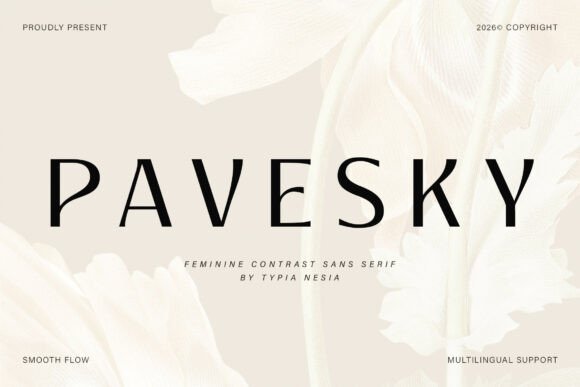
In the world of visual communication, the font you choose is never just a collection of letters; it is the voice of your brand. When aiming for an aesthetic that conveys sophistication, minimalism, and premium quality, the typeface must be flawless. This is where Pavesky enters the conversation. As a modern luxury elegant sans serif font, Pavesky has been meticulously crafted to express beauty and timeless style. It is designed with clean lines, balanced proportions, and graceful curves that create a feminine yet professional aesthetic. Whether you are a designer working on a high-end cosmetic brand, a bride-to-be selecting wedding invitations, or an entrepreneur launching a skincare line, Pavesky offers a solution that feels both refined and accessible.
However, simply downloading a premium font does not guarantee a premium result. Many creators and business owners make critical errors when integrating elegant typefaces into their projects, leading to designs that look cluttered, illegible, or inconsistent. To truly harness the power of Pavesky, one must understand not only its strengths but also the common pitfalls associated with luxury typography. This guide will help you navigate those challenges, ensuring your final presentation is polished and effective.
The Allure of Minimalism: Why Pavesky Stands Out
The appeal of Pavesky lies in its ability to balance simplicity with luxury. Unlike heavy, decorative scripts that can overwhelm a layout, or standard corporate sans serifs that can feel cold and generic, Pavesky sits in a desirable middle ground. Its "elegant sans serif" classification means it retains the readability of modern typefaces while introducing subtle artistic flair. The curves are gentle, and the spacing is generous, allowing the text to breathe. This makes it an ideal choice for industries where visual appeal is directly tied to perceived value, such as fashion labels, jewelry branding, and high-end posters.
For beginners and professionals alike, the temptation to use overly ornate fonts is common. However, experienced designers know that "luxury" is often communicated through restraint. Pavesky achieves this restraint without sacrificing personality. It is versatile enough for digital media—such as Instagram graphics and website headers—and robust enough for print media, including business cards and packaging. The key is understanding that elegance comes from how the font interacts with the rest of your design elements.
Avoiding the "Luxury Trap": Common Mistakes with Elegant Fonts
One of the most frequent errors users make when working with a typeface like Pavesky is what can be called the "Luxury Trap." This occurs when a designer assumes that because a font is elegant, it should be the loudest element on the page. This often leads to using the font in excessively large sizes, bright neon colors, or pairing it with clashing background textures. The result is not luxury; it is visual noise.
Mistake 1: Ignoring Hierarchy and Contrast
A sophisticated design relies on a clear hierarchy. If you use Pavesky for both your main headline and your body text in the same weight and size, the design loses its structure. Alternatively, using a bold, aggressive font for your body copy while using Pavesky for headers can create a disjointed "personality" for the brand. Pavesky works best when it is allowed to lead the aesthetic. If you use it for the headline, consider a clean, neutral sans serif for the body text to maintain that minimalist, classy feel.
Mistake 2: Neglecting Kerning and Tracking
Typography is not just about the shape of the letters, but the space between them. A common oversight is using default spacing. For a luxury font like Pavesky, manually adjusting the tracking (letter-spacing) can significantly enhance the premium feel. For example, in wedding invitations or fashion logos, slightly increasing the tracking on uppercase letters (like P A V E S K Y) can create an airy, high-end look. Conversely, cramming the letters together can make the design feel cheap and rushed, completely undermining the font's inherent elegance.
Mistake 3: Overusing Stylistic Alternates
Many premium fonts, including Pavesky, come with stylistic alternates or ligatures. These are variations of specific letters that add flair. While these are beautiful, overusing them can hurt readability. If every 'a' or 'e' in a paragraph uses a swash variant, the text becomes difficult to scan. Use these special characters sparingly—perhaps just for the first letter of a brand name or a drop cap—to maintain the balance between beauty and usability.
Practical Application: Real-World Scenarios and Solutions
To get the most out of Pavesky, it helps to look at specific applications and how to optimize them.
Cosmetic and Skincare Branding
For a skincare brand, packaging is everything. A common mistake is choosing a background color that fights with the font's delicate curves. If your packaging is a dark matte black, ensure the text color has high contrast, but avoid pure bright white if the packaging has a textured finish, as it can bleed. Instead, try a soft cream or gold foil effect. Pavesky’s clean lines ensure that even at small sizes on a bottle label, the ingredients and brand name remain legible. Before printing a large batch, always print a test sheet at actual size to check how the font interacts with the paper texture.
Logo Design
When using Pavesky for a logo, the mistake often lies in adding too many "extras." Avoid combining the font with complex icons or heavy drop shadows. The beauty of this typeface is its geometry. A better approach is to let the typography stand alone or pair it with a simple, thin-line icon. For example, a fashion label might use the word "VOGUE" in Pavesky with wide spacing, paired with a small diamond icon above the 'O'. This conveys exclusivity immediately.
Digital Media and Web Design
On screens, loading speed and rendering are crucial. A misunderstanding is that all fonts perform the same on the web. If you are using Pavesky for a website, ensure the font files are optimized for web use (WOFF2 format). Furthermore, be mindful of the background. If you place Pavesky over a busy lifestyle photo (common in travel or beauty blogs), the text will disappear. The solution is to use a semi-transparent overlay, a blur effect behind the text, or a solid color block to ensure the elegant letterforms remain the focal point.
Evaluating Your Decision: Is Pavesky Right for You?
Before committing to Pavesky, or any luxury font, for a major project, it is wise to conduct a "stress test." This involves checking the font against your specific needs.
Check for Licensing and Usage: Always verify the license. If you are using Pavesky for a client's commercial product, ensure your license covers commercial use. Using a personal license for a mass-market product can lead to legal issues and unexpected costs down the road.
Test Across Platforms: A design that looks stunning in Adobe Illustrator might look different in a web browser or a word processor. If you are a freelancer handing off a design to a client who will edit it themselves, ensure they have access to the font and that it renders correctly on their operating system.
Review the Character Set: Does the font support the language you need? If you are creating content for a global audience, check if Pavesky includes extended Latin characters or other language support. Missing characters can break the flow of your design and force you to mix fonts awkwardly.
Ultimately, Pavesky is a tool designed to help you articulate a vision of timeless beauty and sophistication. By avoiding the common mistakes of over-complication, poor spacing, and clashing aesthetics, you can leverage its clean lines and graceful curves to create visual projects that truly resonate. Whether it is for a wedding invitation that evokes romance or a cosmetic brand that promises purity, Pavesky provides the foundation for a polished, premium result. Take the time to learn its nuances, and it will reward you with designs that stand the test of time.