Open Book Font: A Creative Guide to Using Dingbat Typography for Education and Design
What Exactly is a Dingbat Font?
In the vast world of typography, we often focus on serif and sans-serif fonts—the workhorses of written communication. However, there is a unique category of typefaces that serves a very different purpose: Dingbat fonts. Unlike traditional fonts designed for writing paragraphs, dingbat fonts consist of symbols, shapes, and illustrations rather than letters and numbers. Among these, the Open Book font stands out as a charming and highly specific tool for anyone who loves literature.
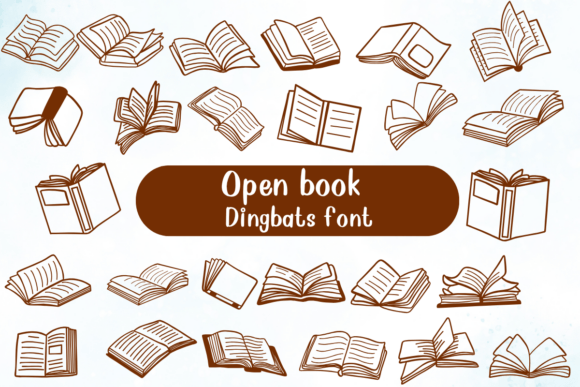
The Open Book font is a specialized typeface featuring a collection of hand-drawn open book illustrations. Instead of typing the letter "A," the user types a key and receives a unique illustration of an open book. Because each character in the font maps to a different book icon, it provides a vast library of vector graphics accessible simply by typing on a keyboard. This approach to design bridges the gap between typography and illustration, offering a whimsical, cohesive aesthetic for creative projects.
The Unique Appeal of Hand-Drawn Illustrations
One of the defining characteristics of the Open Book font is its hand-drawn style. In an era dominated by sleek, digital vectors and high-resolution photography, there is a growing appreciation for designs that retain a human touch. Hand-drawn illustrations convey warmth, personality, and approachability that sterile digital graphics often lack.
When you use a font like Open Book, you are not just inserting a generic picture of a book; you are inserting a piece of art that feels personal. The slight imperfections and organic lines typical of hand-drawn styles make the design feel more authentic. This is particularly effective in environments where you want to foster connection, such as in a classroom or a community library. The aesthetic is playful yet sophisticated, making it suitable for both children’s materials and adult-oriented literary designs.
Practical Applications for Educators and Librarians
For professionals in the education and library sectors, the Open Book font is more than just a novelty; it is a practical asset. Educators constantly seek ways to make learning materials more engaging. Static text can sometimes fail to capture the attention of young learners, but the introduction of thematic icons can break up the monotony of a worksheet.
Here are several practical ways this font can be utilized:
- Classroom Decor: Teachers can create bulletin board headers, reading corner signs, and name tags using the Open Book characters to establish a literacy-rich environment.
- Worksheets and Handouts: Using book icons as bullet points or decorative separators helps to visually reinforce the subject matter of reading and literature.
- Library Systems: Librarians can design signage that directs patrons to different sections. A series of book icons can visually indicate the fiction section versus the reference section, aiding in wayfinding for patrons of all ages.
- Reward Systems: Reading logs and incentive charts can use the varying book designs to represent completed books, turning a simple chart into a visual representation of a student's literary journey.
Enhancing Book Clubs and Reading Apps
The utility of the Open Book font extends well beyond the physical classroom. In the digital age, reading communities have flourished online and through mobile applications. Book clubs, whether local or virtual, rely on branding to create a sense of identity. A logo or flyer featuring hand-drawn book illustrations instantly communicates the group's purpose and invites participation.
For developers and designers working on reading apps, user interface (UI) design is crucial. Icons are the language of mobile apps, and consistency in iconography leads to a better user experience. While standard icon packs are available, using a dingbat font like Open Book allows for a customized look that stands out from competitors. It adds a "delightful literary touch" that can make an app feel less like a utility and more like a companion for the reader.
Consider the visual fatigue users often experience with standard interfaces. By integrating the Open Book illustrations, designers can soften the look of the app, making the experience of tracking reading progress or organizing a digital library feel more organic and enjoyable.
Integration in Business and Marketing
While the font is rooted in education, its applications in business are significant, particularly for niche markets. Businesses that deal in publishing, stationary, or educational supplies need branding that speaks directly to their audience. The Open Book font provides a quick way to generate thematic graphics without commissioning custom illustrations for every single asset.
For example, a self-published author might use the font to create a unique author logo or to design chapter headers in their manuscript. A bookstore owner could use the font for social media posts, creating a consistent visual language that followers will recognize immediately. The versatility of having multiple book icons means that the design never feels repetitive; you can use a different character for different posts or sections of a website, keeping the content fresh while maintaining thematic consistency.
Technical Usage: How to Implement Dingbat Fonts
For those unfamiliar with how these fonts work, the implementation is surprisingly straightforward, though it requires a slight shift in thinking. When you install a font like Open Book on your computer, it behaves exactly like any other font file (TTF or OTF). You select the font in your word processor or design software (like Adobe Photoshop, Illustrator, or Canva).
However, instead of typing words, you type characters that correspond to the illustrations. Here is a basic guide to getting started:
- Installation: Download the font file and install it into your system's font library. It will then appear in the font dropdown menu of your applications.
- Selection: Open your design software and create a text box. Select "Open Book" from your font list.
- Typing: Start typing on your keyboard. You may need to experiment with different keys (A, B, C, etc.) to see which illustration is mapped to which key. Some fonts include a cheat sheet or character map to help you find specific icons.
- Scaling: Because these are vector-based fonts, you can scale them to any size—from a tiny footnote icon to a massive poster header—without losing image quality.
Clarifying Common Misunderstandings
A common misconception regarding dingbat fonts is that they are strictly clip art. While they function similarly, the distinction lies in the format. Clip art consists of individual image files (like JPEGs or PNGs), whereas a font is a cohesive typeface. The advantage of the font format is scalability and color control.
With clip art, changing the color often requires opening an image editor. With the Open Book font, you can change the color of the icons instantly by changing the font color in your text editor, just as you would with a word. This makes the workflow significantly faster for designers who need to match specific brand colors or design themes.
Furthermore, some might assume that because it is a "decorative" font, it lacks professionalism. On the contrary, when used appropriately, it enhances professionalism by demonstrating attention to detail and a deep understanding of the subject matter. A reading program that uses thematic typography signals to parents and stakeholders that the curriculum is polished and well-thought-out.
The Role of Typography in Modern Creativity
Typography is a powerful tool in visual communication. It sets the tone, conveys emotion, and guides the reader's eye. In the context of modern creativity, tools like the Open Book font democratize design. You do not need to be a skilled illustrator to create visually appealing, book-themed materials. The font does the heavy lifting, providing high-quality artwork that anyone can use.
This accessibility is vital in a world where content creation is constant. Whether you are a teacher preparing a lesson plan, a blogger writing about your favorite novels, or a parent creating a reading chart for your child, having access to specialized design tools allows you to communicate more effectively and joyfully.
Conclusion: Adding a Literary Touch to Your Projects
The Open Book font represents the intersection of utility and charm. It is a specialized tool that solves a specific design need: how to quickly and beautifully incorporate the imagery of books into various media. From the classroom to the digital app, its hand-drawn style offers a refreshing break from the rigid geometry of modern design.
By understanding how to use dingbat fonts and appreciating their versatility, creators can elevate their work. The Open Book collection is not just a set of pictures; it is an invitation to celebrate the act of reading in every aspect of our visual lives. For anyone involved in the world of books, it is an indispensable addition to their creative toolkit.