Integrating Cartoon Saturday into Your Creative Workflow
Understanding the Asset
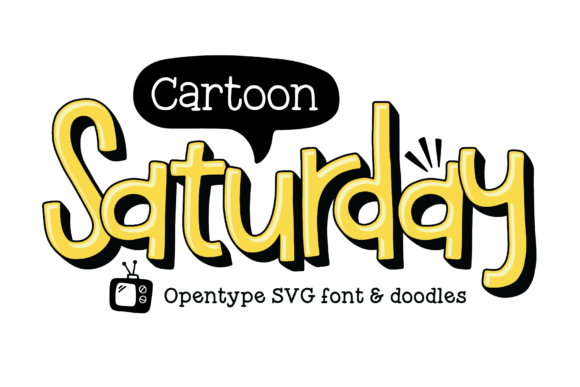
When managing a creative project, whether it involves branding, educational materials, or social media content, the selection of typography is a critical early decision. Cartoon Saturday is a specific font solution designed to inject personality and warmth into visual designs. Unlike standard system fonts, this asset is built as an OpenType-SVG font. This technical distinction is vital for professionals to understand before implementation. The font renders in a vibrant yellow by default, but its true utility lies in its structural layering capabilities. It includes filler and shadow versions that allow creators to build depth and complexity without needing advanced illustration skills.
For the busy entrepreneur or designer, understanding the composition of Cartoon Saturday saves time during the execution phase. You are not merely typing letters; you are deploying a pre-designed graphic element. The inclusion of doodles expands its utility further, allowing users to create cohesive themes across different assets. Recognizing this font as a multi-layered asset rather than a simple text tool is the first step in streamlining your design process.
Pre-Project Planning and Compatibility
Before you begin a design project, you must verify software compatibility. Because Cartoon Saturday utilizes SVG technology, it functions best in modern design environments. Applications such as Adobe Photoshop (CC 2017 and later), Illustrator, and Affinity Designer generally support color fonts. However, if you are using older software or standard text editors, the font may not render correctly, appearing as a blank box or a standard black typeface.
Integrating this asset into your workflow requires a check of your toolset. If you are creating a social media campaign, plan to use a compatible editor to access the full color capabilities. If you are working with a team, ensure that all members have access to compatible software to avoid rendering errors during the handoff process. This preparation prevents bottlenecks later in the production timeline.
Layering for Visual Impact
The core workflow for using Cartoon Saturday involves a layering process. To achieve the professional look the font is designed for, you should not rely on the default setting alone. The process typically involves three steps: placing the shadow layer, placing the filler layer, and finally placing the main yellow font on top.
In practice, this means creating three separate text layers in your design software, all aligned to the same baseline. This technique is particularly useful for headlines on websites, book covers, or event posters. By stacking these elements, you create a tactile, 3D effect that catches the viewer's eye. This method allows for greater control over the final aesthetic; for example, you can adjust the opacity of the shadow layer to soften the look or change the color of the filler layer to match a specific brand palette, though the default yellow offers a classic, energetic feel.
Content Creation for Digital Platforms
For bloggers and social media managers, Cartoon Saturday serves as a high-impact tool for engagement. The font’s inherent playfulness makes it suitable for call-to-action buttons, sale announcements, or headers for lifestyle content. When planning a content calendar, identify the posts that require a lighter, more approachable tone. These are the ideal candidates for this font.
Instead of searching for stock images to convey a "fun" vibe, you can use the included doodles and the bold typography to create custom graphics. This approach is often more efficient than sourcing external illustrations because the doodles are designed to match the font's line weight and style. This ensures visual consistency across your brand assets, a key factor in building professional credibility.
Educational and Informative Materials
Educators and course creators can utilize Cartoon Saturday to make learning materials more engaging. When designing presentations or worksheets for younger audiences—or adults in creative fields—the font breaks down the visual barrier often associated with dense text. Use the shadow version for headings to make them stand out, and pair the font with clean, sans-serif body text to maintain readability.
In a workflow involving the creation of a digital download, such as a PDF guide, the font can be used to highlight key takeaways or "pro-tips." The doodles provided with the font set can be scattered in the margins to break up white space without cluttering the document. This integration helps maintain the reader's attention and improves the perceived value of the educational material.
Managing File Size and Performance
One technical consideration when using OpenType-SVG fonts like Cartoon Saturday is file size. Because the font contains bitmap data or vector SVG data, it is heavier than a standard .TTF or .OTF file. When using this font on a website, you must balance aesthetic appeal with load times.
If you are designing for the web, it is often more efficient to render the text as an image or an SVG graphic element rather than embedding the font directly into the CSS, especially if it is only used for a single headline. This prevents the browser from downloading a heavy font file for just a few words. For print workflows, such as flyers or merchandise, file size is less of a concern, but you should always rasterize or outline the layers before sending the file to a print vendor to ensure the layers remain intact and the colors do not shift.
Color Theory and Brand Consistency
While the default yellow of Cartoon Saturday is part of its identity, it requires a thoughtful background to be effective. Yellow text on a white background lacks the contrast necessary for readability. When integrating this font into your designs, prioritize high-contrast backgrounds such as dark grey, navy blue, or black. This ensures the "friendly" nature of the font translates into "accessible" content.
For brands that do not use yellow as a primary color, the font can still work as an accent. Consider using it for internal team communications, "Friday Fun" newsletters, or informal brainstorming sessions where strict brand guidelines are relaxed. This allows the tool to add value without compromising the core visual identity of a corporate brand.
Asset Management
As you accumulate design assets, organization becomes crucial. Because Cartoon Saturday comes with multiple versions (main, filler, shadow, and doodles), it is wise to create a specific folder structure for it. Labeling the layers clearly in your templates will save you time when you return to the project months later.
Create a "Master Template" file in your preferred software where the font layers are already set up and aligned. When a new project arises—such as a quick Instagram story or a sale banner—you can duplicate this template and simply edit the text. This eliminates the need to manually align the shadow and filler layers every time, turning a potentially tedious process into a one-minute task.
Scalability and Adaptability
The versatility of Cartoon Saturday allows it to scale across different mediums. It works well on small merchandise like stickers or pins, but it is equally effective on large signage due to its bold weight. When planning a multi-channel marketing campaign, you can use this font to create a unified look from the email header to the physical event poster.
Ultimately, Cartoon Saturday